Report a problem with this website

View a Different Account

  1. Go to the Billing section by tapping on the second icon in the bottom navigation.

    blobid0.png

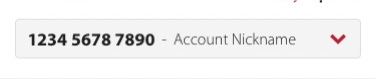
  2. Near the top of the screen, you will see a dropdown with your account number and account name. Tap on the bar to open a dropdown list of your other accounts.
    blobid1.png

  3. Select an account from the list to view.
×

Report a bug

We’re still ironing out all the technical details for mySuperior. If you see anything amiss or click on anything that doesn’t load what you think it should, please let us know. We’re working on serving you better.

×
×
×

You've entered:

Almost done...

To better serve you, please provide the following information. One of our friendly fuel experts will contact you.

×

Contact Us

Still have a question? We'll be happy to answer it


×